
LocaleProof · Unity Editor tool · Available on the Unity Asset Store

Verified. Every imported key. Every cell.

LocaleProof moves your I2 Localization export into Unity String Tables — and then checks the result against your source, cell by cell. It is a verification tool that happens to convert, not a converter that hopes for the best.

The experience

Four steps. Nothing is written until you ask. The imported text is checked at the end.

A walk-through of the bundled sample export (eight I2 terms, two languages), redrawn on this page using the numbers the tool reports. The real Editor window is further down.

1 · Inspect — read everything, write nothing

The export is parsed and laid out: language columns, keys, categories, duplicates, empty cells, and the terms that will not move as ordinary text: one is moved unchanged but flagged for review, and one is not moved at all. The two rows marked below are the ones a human would normally have to find by eye.

SampleI2Export.csv 2 language columns · 8 keys
KeyTypeEnglishJapanese
Default/TitleTextSky Harborスカイハーバー
Menu/StartTextStartはじめる
Menu/OptionsTextOptions設定
Menu/QuitTextQuit終了
Shop/PriceTextPrice: 1,000, "on sale"価格: 1,000円「セール中」
Shop/SoldOutTextSold out売り切れ
Hud/PointsTextYou have {[POINTS]} points[i2p_Zero]…—

Nothing has been written yet.

2 · Convert — one table per category, with a receipt

Seven text terms become four Unity-shaped tables. A manifest records every file written and its SHA-256, so you can see later exactly which files it wrote.

Output folder 4 tables · manifest written
DefaultTitle · 1 key
MenuStart, Options, Quit · 3 keys
ShopPrice, SoldOut · 2 keys
HudPoints · carried as-is, flagged

Existing files not created by LocaleProof are not overwritten unless you allow it.

3 · Import — through Unity's own importer

String Table Collections are created or reused, Locales are set up, and the CSV goes in through the Localization package's importer. The plural-tag value goes in exactly as it was, and stays flagged for your review. The font term never enters a String Table.

String Table Collections Default · Menu · Shop · Hud
KeyTypeEnglishJapanese
Default/TitleTextSky Harborスカイハーバー
Menu/StartTextStartはじめる
Menu/OptionsTextOptions設定
Menu/QuitTextQuit終了
Shop/PriceTextPrice: 1,000, "on sale"価格: 1,000円「セール中」
Shop/SoldOutTextSold out売り切れ
Hud/PointsTextYou have {[POINTS]} points[i2p_Zero]…—

4 collections imported · 1 value flagged for review · 1 non-text term not moved

4 · Verify — the part you no longer do by eye

The imported tables are compared against your original export. Missing keys, changed values, duplicates, extra keys and locale columns that never arrived are counted — any one of them fails the check. A cell that was empty in the source is counted separately, not hidden.

Verify 0 / 13 cells
en
ja
en
ja
en
ja
en
ja
en
ja
en
ja
en
ja
✓
PASS — every imported key and cell checked. 7 keys · 2 locales · 13 cells compared · missing 0, changed 0, duplicate 0, extra 0, missing locale column 0, uncomparable 0 · 1 cell empty in the source

What LocaleProof catches

What moves, what is flagged, what stays behind

Sorted before anything is written. The same eight sample terms, in the three groups the tool reports.

Moved

  • Default/Title Text
  • Menu/Start Text
  • Menu/Options Text
  • Menu/Quit Text
  • Shop/Price Text
  • Shop/SoldOut Text

Text terms, every language column you map, categories as separate tables or one. Written to the generated CSV and imported into your String Tables.

Moved unchanged + flagged

  • Hud/Points plural tag, parameter token

Values with I2 plural tags or {[PARAMETER]} tokens are carried across exactly as they are and listed for review. They are not rewritten into Smart Strings, because that mapping is not one-to-one.

Not moved

  • Ui/HeaderFont Font

Non-text terms — Font, Texture, Sprite, Atlas, Sound, Prefab. A String Table holds strings, so these stay behind, and you know before the first byte is written.

Proof, not promises

Only what was measured is written here

These pages say what was run and on which Editor — and what was never tested.

6000.3.22f1Localization 1.5.4 and 1.5.9 — passAutomated tests executed on a real Unity Editor, including negative tests that must fail when the code is broken.
6000.6.0f1Localization 1.5.13 — passIn our tests, Localization 1.5.9 did not compile on 6000.6 — the package itself failed, not LocaleProof. Use 1.5.13 there.
SHA-256Byte-for-byte parityConversion output is compared byte-for-byte against a separate reference implementation of our own, across five fixed datasets, including one with 1,000 keys × 10 languages.
0Telemetry, network calls, accountsEditor-only assembly, nothing in your build, source included. It reads the files you select and writes only where you tell it to.

Localization 1.5.10–1.5.12 have not been measured and are not claimed as supported. Tested on macOS only.

Real product

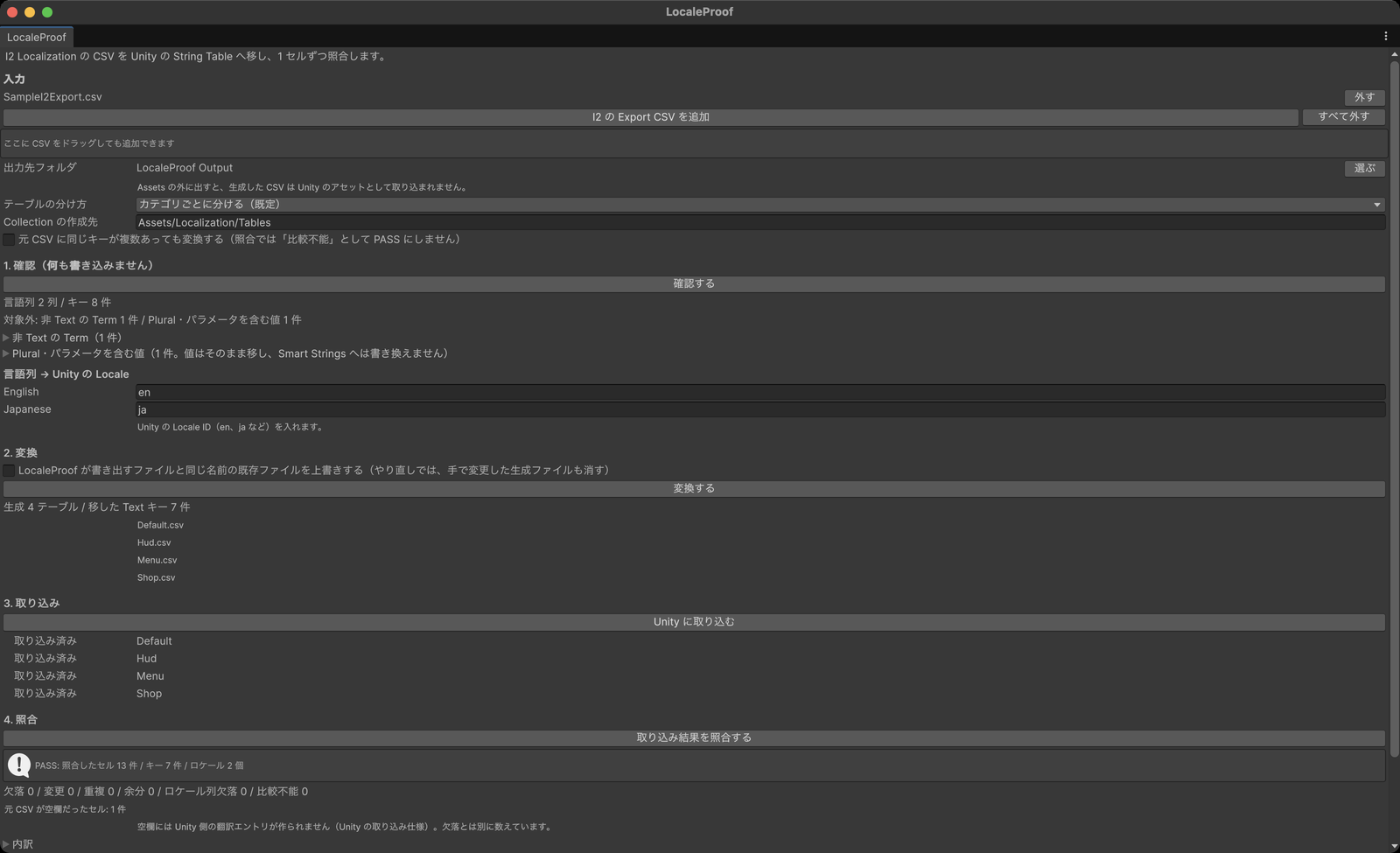
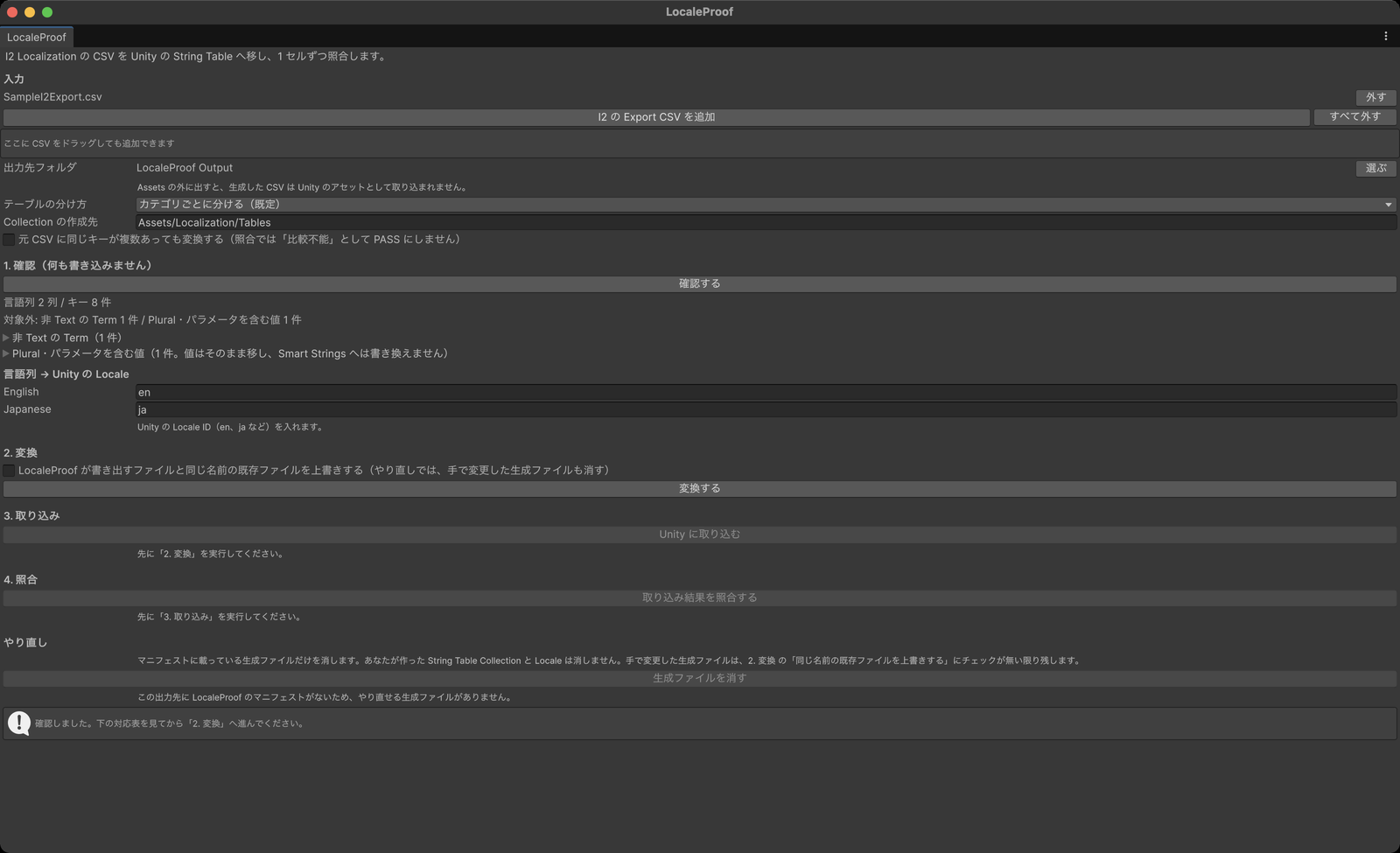
This is the actual Editor window — not a concept image

Both screenshots are the actual LocaleProof window in Unity, run on the bundled sample.

LocaleProof window (Japanese UI) — after Verify
The LocaleProof window in Unity showing the four steps and a passing verification result
After a full run: 13 cells compared, nothing missing, changed, duplicated or extra.
LocaleProof window (Japanese UI) — after Inspect
The LocaleProof window after the inspect step, listing language columns, keys and the out-of-scope terms
Step 1: two language columns and eight keys — one term that does not move at all, and one that moves unchanged but is flagged for review.

Compatibility

UnityLocalization packageResult
6000.3.22f11.5.4Pass
6000.3.22f11.5.9Pass
6000.6.0f11.5.13Pass
6000.6.0f11.5.9In our tests, Localization 1.5.9 did not compile on 6000.6 — the package itself failed, not LocaleProof. Use 1.5.13 there.

Requirements and scope

Move with confidence. Verify before you trust.

LocaleProof is available on the Unity Asset Store. The store page lists the verified Unity and Localization package versions, the full description and the price.

LocaleProof は、I2 Localization から書き出した CSV を Unity 公式 Localization パッケージの String Table へ移し、 元データと 1 セルずつ突き合わせて確認する Editor ツールです。日本語のドキュメントを同梱しています。 Unity Asset Store で販売中です。上のボタンからストアのページへ進めます。